This is the multi-page printable view of this section. Click here to print.
Technical Details
- 1: Components
- 2: Emergency Backout
- 3: IPv6 Support
- 4: Process Flow
- 5: Technical People who say "This is dumb"
- 6: Justifying requested permissions
1 - Components
Containers
Synclias in it’s running state consists of multiple containers, all with a specific purpose:
| Container | Core Tech | Purpose |
|---|---|---|
| web | Gunicorn/Flask App | Web Interface |
| worker | Celery | Back end worker/Task execution |
| beat | Celery Redbeat | Dynamic Task Scheduler |
| redis | Redis | App/worker/beat task communications |
| db | MariaDB | Permanent storage |
Networking
The containers will spin up two networks for communication:
| Network | Containers | Purpose |
|---|---|---|
| redis_network | redis, web, worker, beat | |
| db_network | db, web, worker, beat |
Communications Ports
| Source | Destination | Port | Notes |
|---|---|---|---|
| web, worker, beat | db | TCP 3306 | Standard mariadb port |
| web, worker, beat | redis | TCP 6379 | Standard redis port |
| Clients | web | TCP 8000 | Service exposure to outside world |
Persistent Storage
Docker volumes are used by default, modified as required
| Container | Volume | Mount Point | Purpose |
|---|---|---|---|
| db | db_data | /var/lib/mysql | Primary Database |
| redis | redis | /data | Task Schedule/Storage |
| web, worker, beat | app_shared | /app/shared | Shares ASN Database between containers |
2 - Emergency Backout
If, for some reason, you need to back out anything Synclias does, there’s only one (or two) places you need to modify, the aliases.
To Back out Everything:
- Log into OPNsense
- Go to Firewall -> Alias
- Locate the VPN_Websites alias and edit it
- Delete all of the IPs from in there and click Save
- If you’ve got a VPN_Websites_IPv6 alias, do it there as well
- Click Apply to apply the changes
- Log into Synclias and turn off Auto-Sync if you’ve got it turned on
That’s it, promise, any changes Synclias made to the firewall are gone
3 - IPv6 Support
Let’s address the elephant in the room
At this time, IPv6 support for Synclias is in a beta status.
You can turn on IPv6 support, and with a configured alias, it will fill it up just fine, routing as needed, assuming you have a configured IPv6 VPN and functioning alias/firewall rules
Before I begin, let me start with declaring a posture:
IPv6 is the future, it’s coming/already here.
If you have it and it works, I don’t want people to turn it off, but it does present some unique issues, that I will deal with where I can, but there are places that the user will have to decide on some options.
The goal of Synclias has always been to make no changes to client devices if possible, and minimal changes to network setup where needed. It is possible to change a computer to prefer IPv4 over IPv6, but I’d rather find a better way around this.
The Main Issue
With a dual stack network (IPv4 and IPv6), you essentially have two potential paths to a server. Most Operating Systems will prefer IPv6 if it’s configured and working properly.
Synclias can pretty reliably sort out IPv4 traffic. Sadly, if the OS is preferring IPv6, all of that is irrelevant, an IPv6 packet isn’t covered by IPv4 rules and runs through IPv6, essentially negating all the work Synclias does.
Looking at some of the issues here:
1. VPN Providers
Some VPN providers don’t provide IPv6 connectivity, only IPv4.
This isn’t a problem for them as they route everything over the VPN, so things can’t escape, traffic for IPv6 gets modified in a way that works for the IPv4 connectivity they provide.
However, there’s no real way that if your computer sends an IPv6 packet that I can catch it and route it down a VPN tunnel without doing some extra mapping etc that might break things even more.
Synclias could never be a “professional” product, because “Best Effort” isn’t the binary works or doesn’t work that anyone could reliably guarantee. It works perfectly for my use cases, but I’d never run a business relying on it working 24/7
Best Solution I can Offer for this:
Decreasing order of “good idea”:
- Find a provider that will route IPv6 for you
- Find a common way to configure DNS responses from your DNS server to be IPv4 where possible. If the DNS server gives back an IPv4 address, your device will use the IPv4 stack, and IPv6 is irrelevant - The option here for you is “Prefer IPv4” (Or unchecking “Prefer IPv6”)
- I need to fully investigate 6rd or some other form of making OPNsense reliably route IPv6 over IPv4 VPNs
- Ask users to only use sites that have IPv4 addresses. (This isn’t a thing, but I want to see how much I don’t want to suggest option 5)
- Disable IPv6 on your router/device
IPv6 Subnets
These actually present a “good problem”.
IPv6 Subnets are the same as IPv4 in many ways, and different in others. With so many IPs being assigned to a company/service, doing DNS lookups for one server is actually rather inefficient. Since most companies at the moment have a /64 at least when it comes to subnets their IPs live it, there’s realistically scenarios where we don’t add the IP address, but rather discover the subnet and or just add a /64,/96/128 etc.
This would make the routing rules more efficient, and less likely for scenarios where a server moves, because it’ll be more likely that it’ll move to another address in that subnet. And i’m less concerned about over-scoping, because the IP subnets are so mind-blowing massive in IPv6 that the chances of accidentally including another company are tiny.
That said, it’s going to require some more research to come up with a reliable way to implement this, the back end support is already in Synclias, I just need to decide on some sensible defaults, most likely the default will be a strict mode of just the discovered IP, but I don’t want miss an opportunity to be prepared when a server changers from “1 to 2” in the last hex value of an IP address.
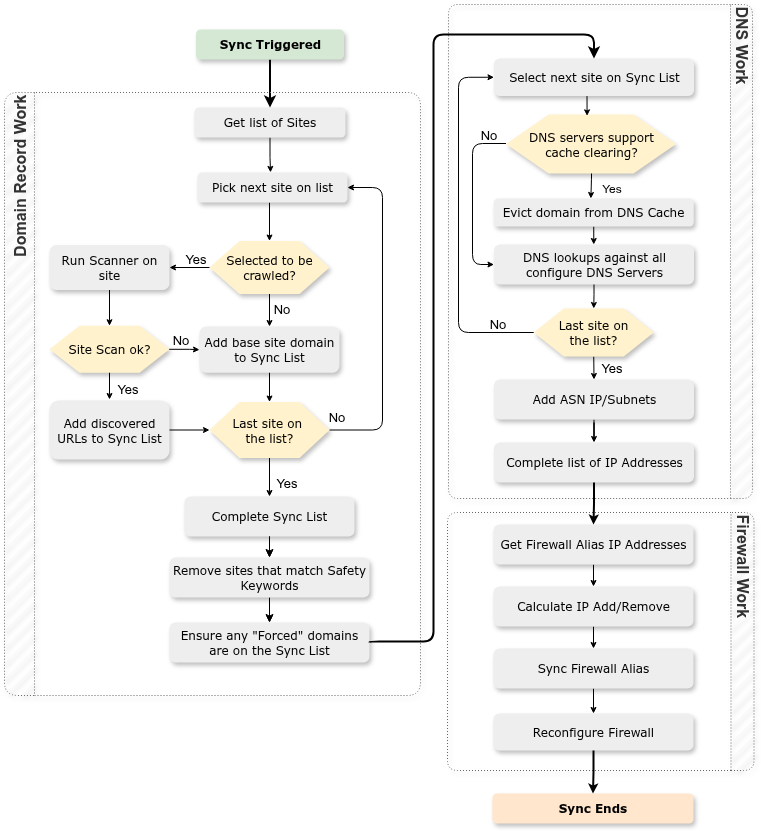
4 - Process Flow
The following diagram shows the process/decisions made by Synclias during a Sync.
5 - Technical People who say "This is dumb"
I get it
Before I go further, let’s discuss the key scope of what I want Synclias to do:
Provide a method where my home network automatically adjusts and routes some sites over a VPN with minimal steps for me
It most definitely does not:
- Provide a guarantee that traffic won’t miss the VPN tunnel and get the site designed for your country
- Provide any way of routing torrent etc clients, if you want that, dedicate an IP, and use it as a source for a dedicated firewall rule.
Misses and What Causes Them
Let’s term a site not getting routed over the VPN as a “Miss”, and there are a lot of scenarios that this could realistically cause misses:
- The big one - a site moves IP, and Synclias doesn’t catch it before a client get there
- Round Robin load balancing using IP addresses
- CDNs that allocate out to hosts that have numerical values (e.g cdn34343.cdn.local, cdn343536.cdn.local) don’t really work with discovery
- Short TTL’s make the IP capture process irrelevant after 5 minutes
Essentially, these boil down to two things:
-
Scenario 1- Discovery - this is a problem, and we’re only given the information in the DNS response/view that we get back. We may get a different view in the near future.
-
Scenario 2: Changes - Clients/Browsers will always follow spec (correctly) and migrate to the new IPs as per the usual TTL expiry etc, and Synclias won’t keep up until the next sync.
Whilst these are different scenarios, they do essentially come down to the same thing - the upstream DNS will be different in a shorter period than Synclias syncs
Follow the specs, but let’s apply the real world
Having said that, let’s look at some real world data here, my working theory from having done web hosting for years, is that sites don’t move IP that often, mainly because there are far easier alternatives to doing so. ( Mainly because TTLs/caching exist, which is a blessing to me and a curse to quick migrations.)
Let’s look at some data
Using - DNS History
Here’s some records:
- discord.gg - has had the same 5 A records since 2022
- i.imgur.com - has moved IP once in 2025, and before that moved once in 2024
- The big “p….hub” site has had the same IP since 2022
I fully understand that migrations do happen, there will be misses, but for most sites, migrations of IP addresses are relatively rare these days, and I’m willing to take a few misses every year.
That said, this isn’t designed for someone to run a business over. No promises, best effort.
Why do I think IPs are pretty stable?
With things like:
- Blue/green deployments
- Anycast
- Elastic IPs etc
It’s far more common these days for your external IP to stay the same, but use a device behind it to manage the traffic migrations rather than DNS, because:
- There’s far more granular control options than DNS provides
- DNS propagation exists
- TTLs generally don’t come into it (which is essentially 2, but slight different)
So, it’s far easier to migrate a site these days than by using DNS to do so, and the cost of a DNS screw up isn’t just that you need to roll it back, you need to wait for propagation etc, which means unreliability for your site for longer than necessary.
Let’s be honest, with Elastic IPs AWS charge per hour for an IP that doesn’t change, and people are happy to pay it.
As such, the only real time anyone changes IP address is when the easier options aren’t available.
IPv6
This is going to be an interesting one, companies have a lot more IPs available to choose from, so we might see more movement, originally I set this up as IPv4 only and thought IPv6 would be a nightmare, but frankly, it’s been fine, as long as people have a VPN that matches their single/dual stack.
Sticking to the specs
Back to DNS, my preference will always be what I do with Technitium if possible, kick out the DNS entry and refresh it, because I want the promise that a TTL gives, but we work with normal DNS as well because the Venn diagram of OPNsense/VPN/Technitium users that might find it helpful is probably a circle around me.
With regards to the assumption some have made that i’m trying to do something outside of the DNS specs, I’m not, I promise. No pinning, no hosts file entries etc, it’s better a site works with a miss than I do something stupid and start breaking people’s connectivity.
Obviously long TTL’s work better for Synclias, but a shorter TTL and a DNS change just means that the user will get routed through their normal connection, I’m not breaking sites in any way, I’m not extending TTLs, or fixing IPs at all.
So yeah, misses happen, but I’m happy to accept them a couple of times a year. The VPN client still works when you need it, or go click Sync.
A note on Kill-Switches
Sadly, as you can imagine, this isn’t really compatible with them network wide as I’m happy to accept the miss in terms of browsing, and since we follow instead of lead in terms of IP addressing, I can’t predict where a site’s going to move to.
I can see the use for a kill switch for certain use cases, anything you need to make sure that it has no chance to get over the normal internet.
But outside of that - my question is do you really need a kill switch for your main desktop? I think a lot of people see the cool term and want that, but for my use case, it’s just not necessary, if I was running most things that would need one, it’d be a dedicated host with it’s own kill switch.
Wrapping it up…
I appreciate if you decide it’s not for you, that’s fine, I appreciate that you took the time to read this, it’s a lot longer than I thought it would be.
6 - Justifying requested permissions
As Synclias asks for permissions on your router, these are the exact requested and why
OPNsense
| Permission | Reason for Permission |
|---|---|
| Firewall: Alias | Listing Aliases on the Firewall. Needed for testing the Alias and reading the contents |
| Firewall: Alias - Edit | Adding/Removing IPs/Subnets from the Firewall Aliases |
| Diagnostics: PF Table IP addresses | Required to allow the calling of “Reconfigue Firewall” to apply the changes |
| Diagnostics: Show States | Sync option for clearing states, greatly improves test results rather than working around established sessions |
Technitium
| Permission | Reason for Permission |
|---|---|
| Cache - Delete | Removal of Cache records. They will be re-populated straight away as Synclias calls the DNS server |