5. Setting up auto-sync
Categories:
Warning
1. Do not keep "Flush States" on for auto-syncs
2. Using a shorter sync time may seem like a good idea, but it really isn't.
Changes to firewalls can cause problems with connections clearing etc.
- This is made even more important when Flush States is enabled in App Settings as connections are dropped.
- Please turn this off for regular use
- You do not want all your firewall states to drop every X hours.
More details of the impact of Flush States can be found Here
You may also consider not turning on auto-sync and seeing how long it takes to start missing on its own, you may be surprised.
With site(s) added, you can set up a Sync schedule
- Head back to the Settings page and find the App Settings section
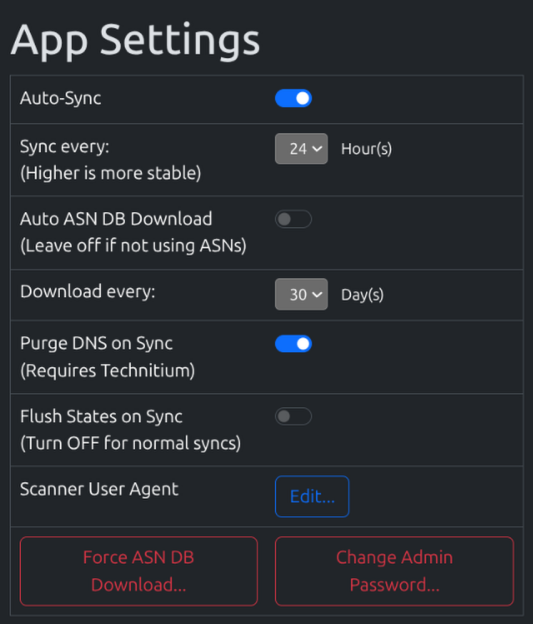
- Change Flush States on Sync to OFF
- Change Auto-sync to On
- You can adjust the sync schedule, at the start leave it at 24 Hours
As long as “Flush States” is Off, feel free to drop this as low as you like.
These settings apply automatically when set, and every 24 hours will schedule a sync for 0000 daily.