The Double Sync Problem
Categories:
When normally installed, Synclias has the same access to sites as any machine on your network, which means that if a site is blocked completely, the scanner doesn’t function.
This causes what has been termed the “Double Sync” problem, where two Syncs are required to get a site to work completely. It’s more of an inconvenience but if a site isn’t working after a Sync, it’s worth bearing in mind.
Sites this Affects
They’re fairly rare, mainly it’s any site that doesn’t return anything back at all apart from the text “Not available in your country”
If a site shows a website but then warns about your location, or something else blocking it, you should get some decent results on the first time through.
Example of the Double Sync Issue
As an example, lets say:
- There’s a site you want to access: web.site but it’s completely blocked by IP.
- This site stores pictures and videos on images.web.site, vids.web.site and assets.web.site
When the scanner first runs, it won’t be able to scan the site and discover images, vids or assets…, but you’ll be offered to add the web.site site to the list anyway.
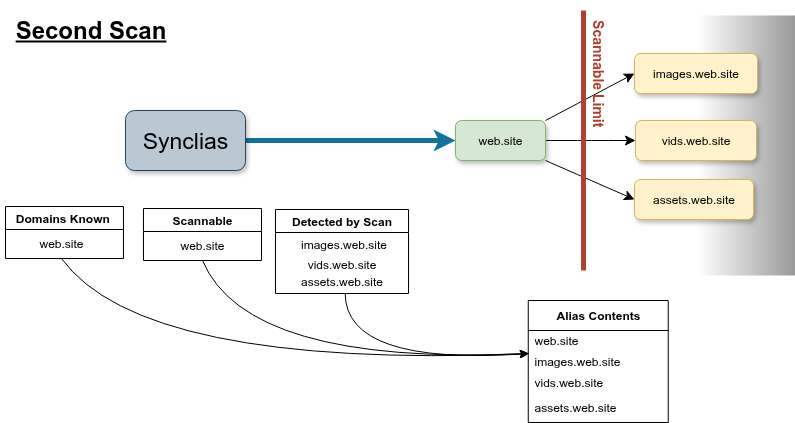
On the first sync, ‘web.site’ will work, but it could be that it won’t load anything from images, vids or assets, because the VPN doesn’t know about them. (They may still work as only the main site blocks non VPN traffic.)
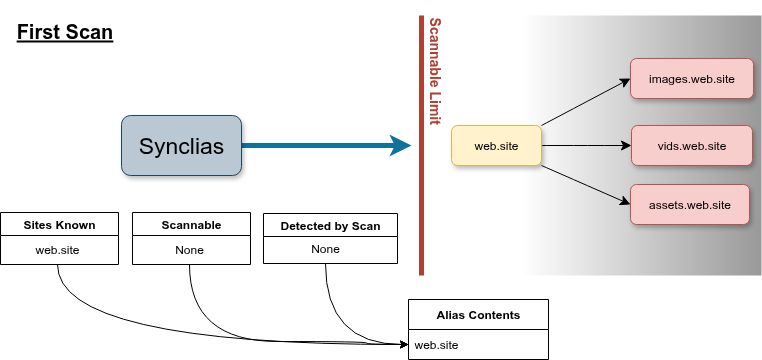
On the second sync, like your web browser, the scanner can read the website’s code, and sees the links to images, vids and assets, so this time, it’ll add them all and the site should work fine.
Ways around This
There’s really only two ways to deal with the issue:
- Remember when adding new sites that this could be a problem, and when adding a site use the process “Scan, Sync, Scan, Sync”
- Add the machine running the Synclias worker container to always route it’s traffic over the VPN, this is easy to do on the firewall, but if you’re sharing that machine with other uses it might not be desirable